Tampilkan postingan dengan label Android Firmware. Tampilkan semua postingan

Download Firehose Bypass Auth for Xiaomi All Type

These are firehose collection for Authentification Bypass Xiaomi all models. Authentication needed when flashing your xiaomi smartphone. This Auth file is modify for bypass xiaomi account lock. Thus you could overcome locked micloud on your xiaomi smartphone.

AUTH FOR AUTHENTICATION BYPASS XIAOMI ALL MODELS :

Firehose bypass Auth Xiaomi Redmi S2 (YSL) ---- download

Firehose bypass Auth Xiaomi Redmi Note 6 Pro (Tulip) ---- download

Firehose bypass Auth Xiaomi Redmi Note 5 Pro (Whyred) ---- download

Firehose bypass Auth Xiaomi Redmi Note 7 (Lavender) ---- download

Firehose bypass Auth Xiaomi Mi Max 3 (Nitrogen) ---- download

Firehose bypass Auth Xiaomi Mi 6X Wayne ---- download

How to bypass micloud locked using Firehose bypass for Xiaomi???see the step here>>>

Download Firmware Xiaomi Redmi Note 3 Pro Kenzo

ROM for Redmi Note 3 and Redmi Note 3 Pro
License : Freeware
Xiaomi Redmi Note 3 has 2 variant, first Redmi Note 3 Standard and Redmi Note 3 Pro. Both has no significant difference whether the design, the screen and the body. It has a metal body with fingerprint sensor at the rear.

The difference between these 2 is in the card slot and camera. Besides, the processor for Xiaomi Redmi Note 3 Pro is Qualcomm Snapdragon 650 1,8 GHz, while Redmi Note 3 Standard is a bit lower version, Helio 10 Mediatek Flagship.

Your Redmi Note 3 / Pro smartphone perhaps stuck on mi logo or fastboot logo, or it's just dead with LED show up, it is called bootloop or missing operating system. You could just try to flashing it using your PC's or laptop. Here in this blog I could give you the firmware. For the flashing step you can find it here>>>

There are some method for flashing, including via Recovery Mode, Fastboot Mode, or you want to try some custom ROM version. Here is the detail for those ROM :

1. Recovery ROM
  • file extention is .zip,
  • using update method via TWRP or Mi Recovery,
  • Not wiping out your internal data, except you do wipe data or factory Reset,
  • Used to update ROM version, but downgrading is not available,

2. Fastboot ROM
  • file extention is .tgz or .tar,
  • Wiping all your internal storage data,
  • Flashing using flash tools such as Fastboot Update and Emergency Download Mode (EDL) using MiFlash Tools or SP FlashTools for Mediatek chipset.

3. Custom ROM
  • file extention is .zip,
  • You can only install via Rooted mode, using TWRP Recovery,
  • Wiping all your internal storage Data.

Here is Link for the ROM :

ROM CUSTOM
 ROM Version
 MIUI Version
 ROM Name
   MIUI 8 Global Stable 
 Xiaomi .EU
  MIUI 8 Global Stable
 Xiaomi .EU
 -
 Android Nougat 
 MIUI 8 Stable 
 MULTIROM

ROM GLOBAL DEVELOPER
 Recovery ROM
 Fasboot ROM
Version
  MIUI 8 
 MIUI 9

ROM CHINA STABLE
Recovery ROM 
 Fasboot ROM
Version
  MIUI 7 
 MIUI 8

ROM CHINA DEVELOPER
 Recovery ROM
 Fasboot ROM
 Version
MIUI 8 
MIUI 9 

ROM GLOBAL STABLE
 Recovery ROM
 Fasboot ROM
Version
MIUI 7
MIUI 8
 MIUI 9 
 MIUI 10

How To Download from Programsix?? Click Here>>>

Download Global ROM for Samsung Galaxy S7 and S7 Edge G935

Samsung Galaxy S7 Edge


Here is the global ROM for Samsung S7 and S7 Edge, it is ROM 8.0 Oreo. It is fully maintained and stable USA ROM.

Devices Supported:
  • Sprint Galaxy S7/ S7 Edge
  • T-Mobile Galaxy S7/ S7 Edge
  • AT&T Galaxy S7/ S7 Edge
  • Verizon Galaxy S7/S7 Edge
Features:
  • Full Languages Supported
  • Directly flash through Odin, from any level
  • No Knox trip (0x0)
  • No Lag
  • Stable, OTA update normally
  • Add quick toggling on/off cellular data
  • Global phone dial
  • Allow adjusting LTE/3G/2G, 3G/2G, 3G, 2G
  • More
Before Flashing You're Gonna Need some Stuff :
  • Samsung USB Driver, download it here>>>
  • Odin Flash Tool version 3.13.1, download it here>>>
  • You can find the flashing steps here>>>
Download it Below :
Global ROM 8 for Galaxy S7 and S7 Edge
filesize : 2,3 GB
click on the button to download
How to Download from Programsix?? click here>>>

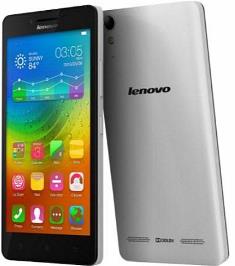
Download Firmware Lenovo A7000, A7000 Plus, A7000-a All Version and Upgrade

Lenovo A7000-A


All firmware for lenovo A7000 / Plus, please note that you should check the model correctly to prevent brick your phone, here's the list, you can download from link straight below the specification.

I explain the detail how to flash step by step, even the beginner could do for himself. I collect the firmware in several part, you can put them in one folder and extract it.

Firmware Version For Lenovo A7000 / Plus
  • Device brand: Lenovo
  • Model Number: A7000-a
  • Country: Global
  • OS: Android 7.0.1 Lollipop
  • Filename : A7000-a_S153_151127 ROW
  • Device brand: Lenovo
  • Model Number: A7000-a
  • Country: Global
  • OS: Android 6.0.1 Marshmallow
  • Firmware Version: S228 VIBE UI 3.1
  • Filename : A7000-a_S223_160405_ROW
click on the button to download
For Flashing Tutorial you can Find it Here>>>
How to download from Programsix?? click here>>>

Download Firmware Samsung Galaxy Note 8 SM-N950F

Samsung Galaxy Note 8


The samsung Note 8 SM-N950N may be a Latest Smartphone that is Run on android versions Nougat OS Upgradable to Android P 9.0. Samsung galaxy note 8 specs: power-driven by an Exynos 8895 Processor, the Galaxy Note 8 SM-N950N may be a twin Sim Smartphone that settle for two Regular SIM card, property Option’s embrace 3G, 4G, GPS, Wi-Fi, Bluetooth, etc, device embraces Goryo proximity Gravity, etc. Below I give you the firmware only for Samsung Galaxy Note 8 Model SM-N950N, not other models. See your model on box or attached at the phone. Wrong firmware could make your phone not function or brick.

I divided the firmware into 3 part of zip files, please put them in one folder and then extract only part 1, it will automatically extract all part.

Firmware Details :
  • Model: SM-N950F
  • Model name: GALAXY NOTE 8
  • Country: Global
  • Version: ANDROID Nougat 7.1.1
  • Filename : SM-N950F_N950FXXS5CSA1_N950FOXM5CRHA_XXV.zip
  • Model: SM-N950F
  • Model name: GALAXY NOTE 8
  • Country: Global
  • Version: ANDROID Nougat 7.1.1
  • Filename : SM-N950F_N950FXXU5DSB2_XXV.zip
filesize : 4,2 GB
Before flashing you also need :
  • Samsung Android USB driver get it here>>>
  • Odin flash tool download it here>>>
Instruction to Flashing :
  1. Download and extract/unzip the firmware file,
  2. Download and extract Odin ZIP file, get odin flash tools here>>>
  3. Open Odin software,
  4. Reboot device in Download Mode (press and hold Home + Power + Volume Down),
  5. Connect device and wait for "ID: COM" to turn blue in Odin
  6. Add the downloaded firmware file to AP/DPA
  7. Make sure "Re-Partition" is NOT ticked
  8. Click the "Start" button to begin the installation process.
  9. After that, your phone should be rebooting to first use.